Software release & reference ID
| Your Research B.V. Zeeweg 28, 1271 VX Huizen (The Netherlands) |
| Release-103 |
| 31-03-2023 |



Introduction
Your Research continuously develops its software to improve functionality and user-friendliness. New versions of Your Research software often include improved features, bug fixes, and security updates, which makes using the software easier and safer.
This document includes the release notes after Your Research has installed a new version of its software. If you are concerned by a product update, please feel free to contact our support desk which can be reached via support@yourresearch.com support@yourresearch.com
The release notes contain information about:
- Maintenance of the software
- New available features
Features
Your Research develops new features for users because we want study teams to perform research processes and tasks more efficiently and effectively. We provide new functionality based on what users may find useful. Do you want to contribute to this development, please let us know via support@yourresearch.com
In this release, the following activities have been carried out:
Features | Explanation |
Parent visitplanner | The Visit Planner Manager is an extension of the Visit planner and is intended for organizations that carry out multiple studies with the same resources. The module provides an overview of how the resources are distributed over the studies, insight into all agreements made across the various studies, makes it possible to plan in an overall agenda and provides insight into future needed resources (forecasting). |
Filtering inbox | Added the possibility to filter the Participant Inbox by a Date Filter.
|
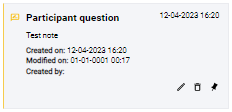
Pin notes | Added the possibility to PIN and UNPIN the notes.
|
Quick search | Added extra columns in the quick search:
|


Maintenance
Your Research performs continuous maintenance on its software for the following reasons:
- To fix bugs and errors: Regular maintenance allows for the identification and fixing of any bugs or errors in the software, which can improve overall performance and user experience.
- To ensure compatibility with new hardware and software: As new hardware is released, it is important to ensure that the software is compatible. This can be done through regular maintenance updates.
- To improve security: Cybersecurity threats are constantly evolving, and it is important to keep software updated to protect against these threats. Maintenance updates often include security patches to help protect against potential vulnerabilities.
- To improve functionality: Maintenance updates can also include new features or improvements to existing ones, which can enhance the user experience and improve the software’s overall functionality.
- To extend the life of the software: Regular maintenance can help extend the life of the software by ensuring that it remains up-to-date and relevant. This can help save money by avoiding the need to replace the software.
In this release, the following activities have been carried out:
Maintenance items | Explanation (if applicable) |
eConsent | Possible to change the name of the SignedDocument or Receipt |
Participant Notes | Possible to remove notes |
Dashboard configuration | Solved a bug in the Dashboard Configuration where setting and changing the title was failing |
Your Research forms | Solved a bug where the queries for the ParticipantActivity where not looking at the CanParticipantView property of a question. |
Import | Solved a bug where the ImportFile was not saving the name of the file. |
Mobile app | Solved a bug where the aligning of the MultiSelect and Select was off. |
Visit planner | Improved perfomance |
Was this article helpful?
That’s Great!
Thank you for your feedback
Sorry! We couldn't be helpful
Thank you for your feedback
Feedback sent
We appreciate your effort and will try to fix the article