This page provides an overview of the new functionality, usability improvements, and system changes that may impact users.
Audit Trail Updates
This release enhances the audit trail framework to improve regulatory compliance, traceability, and auditability across the platform. Audit logging has been expanded across all major services and centralized in a unified audit service, with improved human-readable formats. The audit trail now includes system access events, device-level activities, and all administrative actions. Audit records support permission-based encryption, and authorized users can add contextual comments to audit entries.
In addition, a dedicated Session Log has been introduced. Session logs are available via a separate page and are not part of the audit trail. These logs capture user session activity, including login and logout events, session start and end, and the pages accessed by authenticated users.
Improved Data Change Request (DCR) Workflow
Introducing both a structured data change process and improved query generating and tracking functionality within Almac Trial Coordinator (ATC). These updates provide a traceable and compliant path for both site-initiated data changes and client data questions or suggestions for change. This minimizes the need for Almac staff interactions and gives users self-service control for most data updates.
Also included:
- Permission control at the role level and detailed audit trails for all steps of the process.
- Configurable to send notifications to the client if a sensitive data change is made by the site.
- System generated queries based on data changes that affect questionnaire branching, flow, or logic.
Implemented New Identity Provider (IDP)
This release introduces a new Identity Provider (IDP), replacing the current solution and migrating all users accordingly. The upgrade supports future integration with third-party identity providers via FIDO, TOTP, and SSO.
Improved User Experience
This release includes several improvements to our tasks, forms and process presentations to users:
- Updated our forms user experience with automated movement to next steps, additional instructions for clarity, a progress bar and a summary screen for review prior to submission.
- A new design for the events in the task detail screen was applied to improve events handling.
- Informed Consent File (ICF) upload has been added to the eConsent widget to improve usability.

- Added and in-form validation for Participant Code during registration to alert users earlier if there is a risk of duplication. Also, added Country Code to participant and contact person phone numbers.
- Grouping added to the Task Detail screen to allow grouping of tasks by measurement and/or visit.
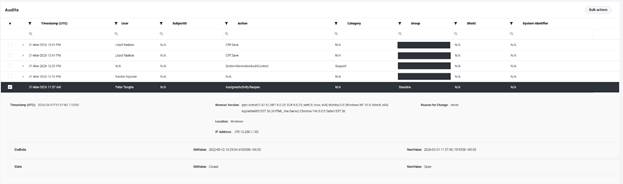
- Consolidated audit data to a single Audit screen to replace multiple sources in the audit tabs. Previously all detail screens had an audit tab, so when you opened a site there was a detail page with audits specific to that site. This is now removed from the detail pages and all combined in the new Audit screen available from the Studio.
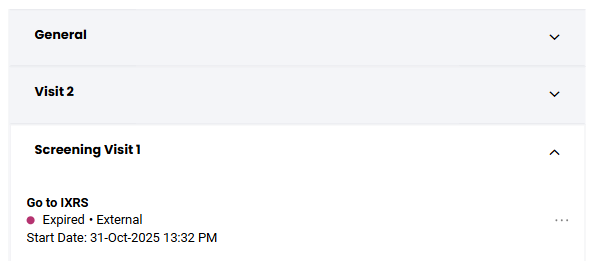
- Added User Action as a record in Task screen. From the workflow we can trigger actions that need to be done by the user before continuing. Previously these records were only displayed using an icon on the top bar, but we now show all workflow actions that are waiting for user input/action as a record in the task overview.
- Implemented bookmark functionality to allow a URL to be tailored for the participant. This allows the system to display the participant page directly after logging in.
- Updated e-Consent functionality to support multiple signers by using configurable generic signer roles instead of predefined participant types.
- Automated closure of Add Participant progress pop-up screen to close after the information is successfully committed to the system.
- Corrected bugs to user experience for button availability, question dependencies and for visit scheduler.
Passwords and Security
The “Forgotten Password” functionality has been updated to improve usability. The password reset process now uses a shorter and simpler verification code, reducing complexity for end users. This change addresses user feedback indicating that the previous lengthy and complex codes were difficult to use and aligns the experience more closely with common industry standards.
Analytics Dashboard for Participant Compliance
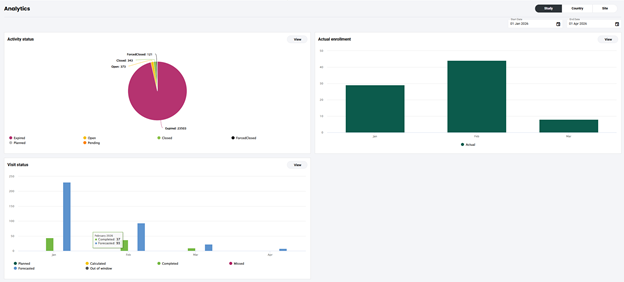
For newly created studies, an analytics dashboard is now available to provide improved insight into participant compliance. A new dashboard widget presents summary metrics on task completion, such as diary compliance, and participant statuses. Compliance data is visible at study, site, and country level, enabling more effective monitoring and oversight across the organization.
Reporting Improvements
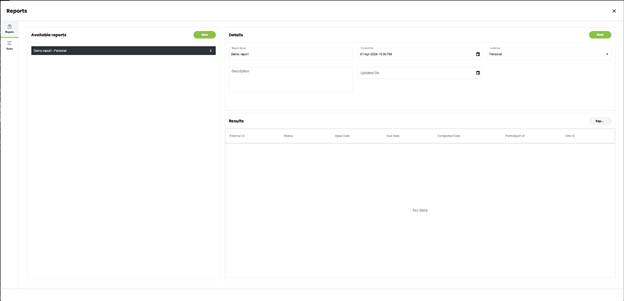
Reporting capabilities have been enhanced with the introduction of dashboard data export and a new report builder. Reports can now be executed directly within the user interface and exported to Excel or PDF formats.
If existing CSV-based reports need to be migrated or new reports need to be created, please contact your designated contact person or the support desk for assistance.
2026Q2.01 - 12-May-2026
Minor bug fixes on participant portal
2026Q2.02 - N/A
Skipped for version control
2026Q2.03 - 21-MAY-2026
Minor bug fixes on participant portal, workflow service and framework.
2026Q2.04 - 05-JUN-2026
Minor bug fixes on participant portal, web app, network management, platform and web services.
2026Q2.05 - 19-JUN-2026
Minor bug fixes on web app for session expiry handling and contact information translations.
2026Q2.06 - 09-JUL-2026
Minor bug fixes in Participant Management System for chat messaging, questionnaire and participant profile.
2026Q2.07 - 23-JUL-2026
Minor bug fix in Participant Management System for questionnaire allowing image upload in addition to existing camera input..
Was this article helpful?
That’s Great!
Thank you for your feedback
Sorry! We couldn't be helpful
Thank you for your feedback
Feedback sent
We appreciate your effort and will try to fix the article